Adding an app to Control Tower
Two doors in. + New app starts from nothing and walks through the whole setup; + Add app registers a folder that already exists. Either way the app lands as a new tab with Dev, SIT and Prod cells — and it can be fully working in Dev and SIT before Prod exists at all.
Two ways in
+ New app — for an app that does not exist yet. Name it and Control Tower makes the folder, opens Claude in it, and guides the rest. Dev and SIT come out of it working.
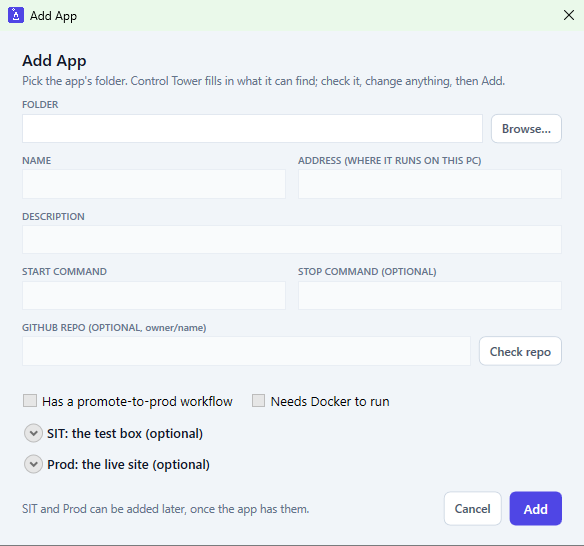
+ Add app — for a folder that already runs. Control Tower detects what it can, everything stays editable, and SIT and Prod are optional blocks that can be filled in now or later.
+ New app: seven steps, each checked before the next
The wizard takes over the main window. A rail on the left shows the seven steps and where you are; nothing moves on until the current step's check passes.
- Check your setup. Reads the PC and the SIT box, prints no secrets: Git, Python, GitHub CLI signed in with the right permissions, SSH, Claude Code, .NET, Tailscale, Docker, the shared CI repo, and a password-free SSH login to the box. Missing items are listed first with the exact fix. Optional ones show as optional.
- Your app. Name, one-line description, private GitHub repo name, and three yes/no options: has a promote-to-prod workflow, needs Docker in Dev, holds sensitive data. It checks as you type: valid folder name, name not already used, folder empty. On Next it confirms the repo does not exist on GitHub and that the SIT box has no leftovers from an earlier app of the same name.
- SIT port. Choose where SIT runs (the Spark over SSH, or this PC in WSL). It suggests the lowest free port in 8081–8099 and can test it: a throwaway server is started on the box, then this PC tries to reach it, so a blocked port is found now, not after the build. Everything up to the launch button only reads; the port test starts a throwaway server that stops on its own.
- Build it. Claude scaffolds the app and runs it on this PC. Control Tower creates the folder and hands Claude the answers already given, so nothing is asked twice. Claude stops and asks before anything leaves the PC: saving the first version, creating the private repo, the read-only deploy key, the SIT setup.
- Add SIT keys. The one step done by hand: the SIT credentials are typed into a normal PowerShell window and stored as GitHub secrets. Passwords and logins are never typed for me.
- Ship to SIT. Claude pushes; the gates run, then the shared deploy step puts it on the SIT box and checks it is answering. The wizard follows the real pipeline result.
- Prod. The last page confirms Dev and SIT are ready and says how to work from here. Prod is not part of the wizard; see §05.
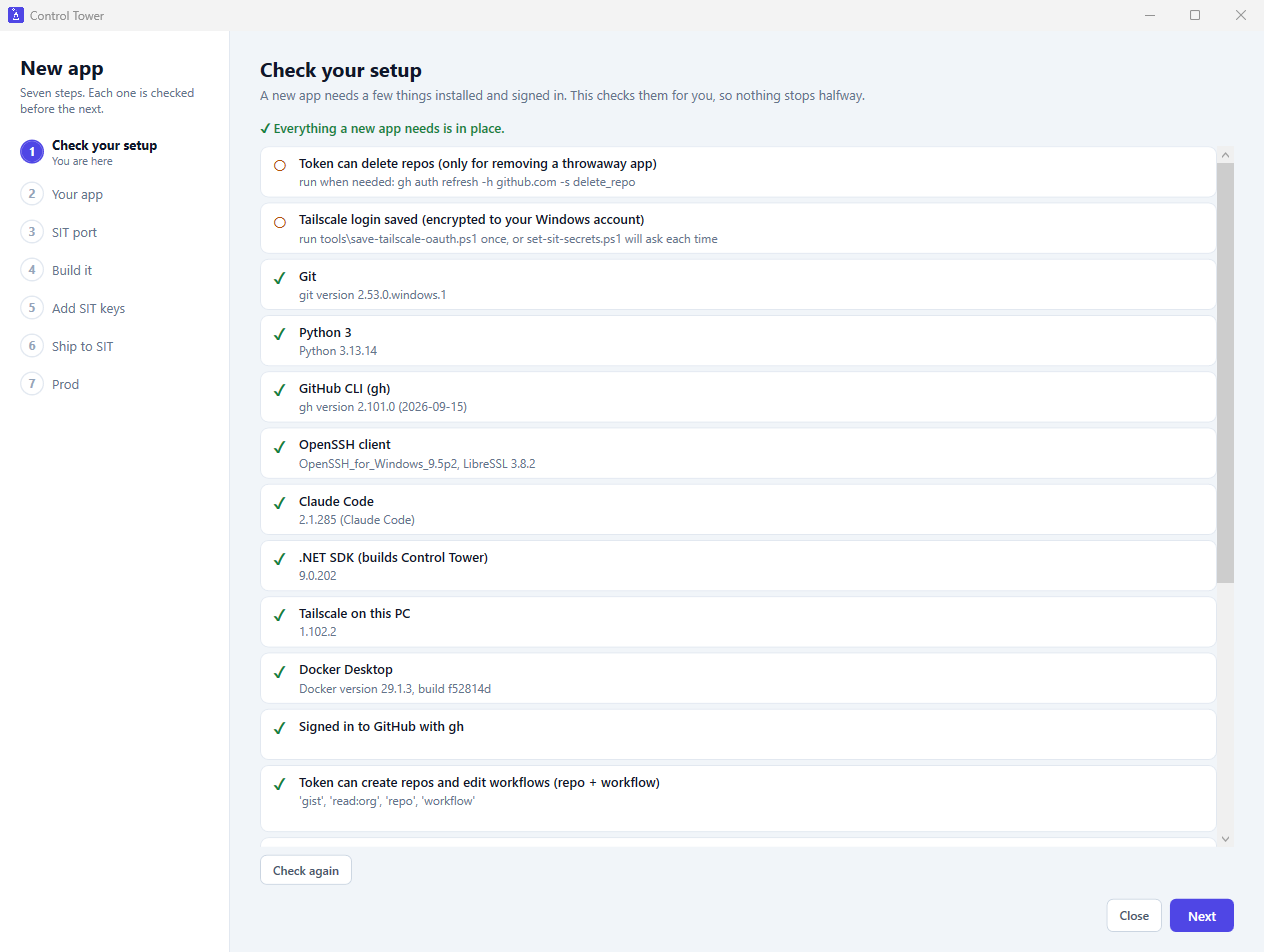
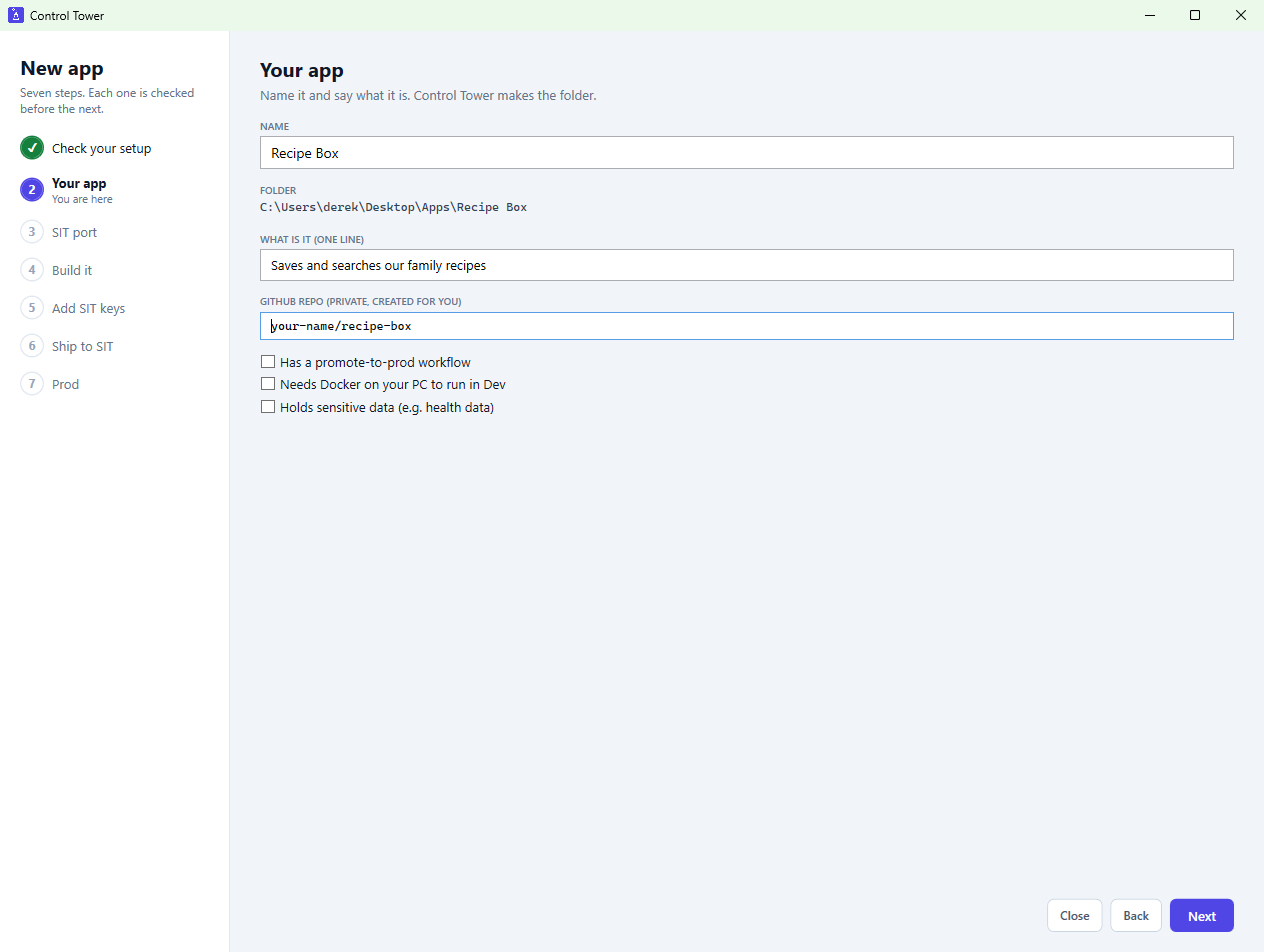
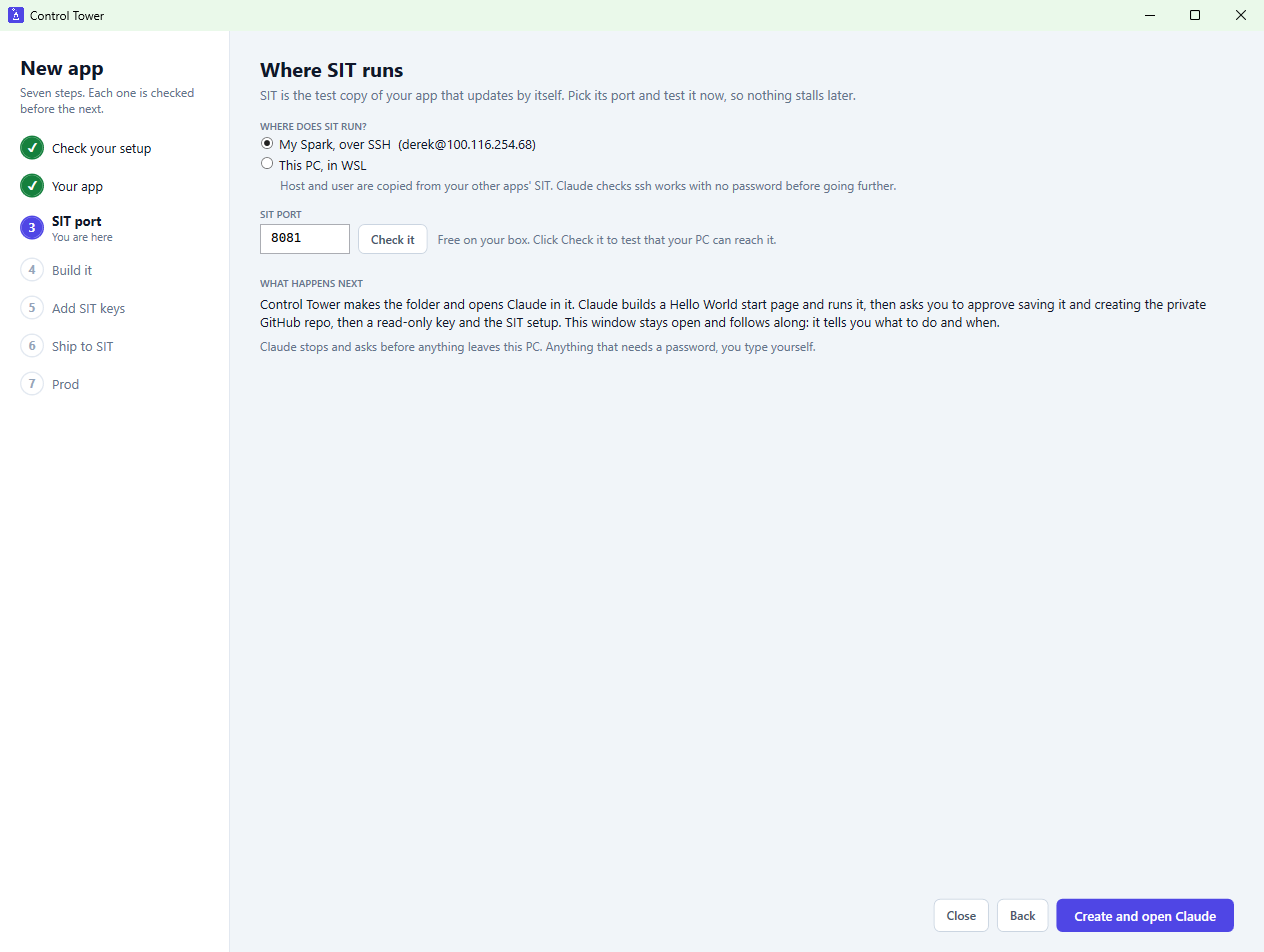
Follow along: the Setup guide
Steps 4–6 follow real state rather than a script. Every app tab has a Setup guide button that shows the same thing as a live checklist: each step is tagged YOUCLAUDEAUTO, it re-checks every 15 seconds, finished steps tick themselves off, and the next one is highlighted with exactly what to type and where. State is read from GitHub and the box (repo exists, secrets set, last pipeline green), never stored, so it cannot drift from reality.
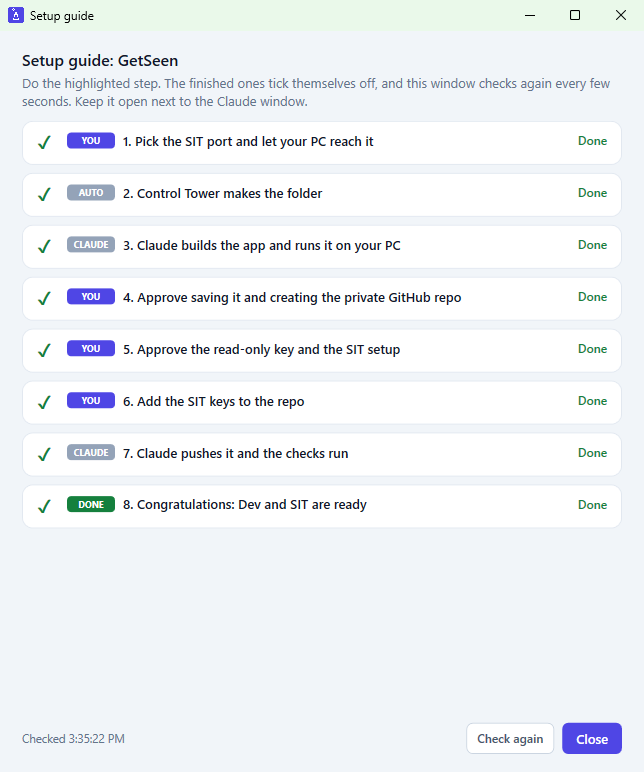
What Dev and SIT get
Dev — this PC
- A folder next to the other apps, a git repo on
main, a README that states the v1 scope, and a rules file for Claude. - A Hello World start page that shows which environments are live.
- A pipeline file with five gates: secret scan, lint, security scan, tests, dependency audit — the same shared gates every app uses.
- A pre-commit hook that scans for secrets before any commit lands.
- Start and stop scripts on the next free local port; Stop ends the whole process tree. Started and checked with a real request.
- Registered as a new tab; the app list is backed up first.
SIT — the test copy
- Runs on the Spark (or WSL) as a service that survives reboots, on a tested port.
- A
sitbranch. A read-only deploy key is made on the box for this one repo; the private half never leaves the box. - Every green push to
mainruns the gates, then deploys to SIT and health-checks it on the box. A push tositruns the gates only. - Its own secrets, set by hand; none are written into files, logs or the app list.
- Registered with its address and deploy command, so the SIT cell, Merge to Main → SIT and the alignment checks work at once.
Prod — the live site
- Optional. An app without Prod shows a greyed "no prod environment" cell, has no TO Prod button, and is never counted as a problem.
- Same for SIT: add an app in Dev only and it is fully usable.
- Details in the next section.
Prod: always a person's click
Setting an app up never promotes it. Prod is read-only to Control Tower until a person clicks TO Prod, and that button refuses unless every GitHub check on the exact commit is green, read fresh at the click (the four refusal rules). It is never automatic, and it is never run by Claude, including inside the setup flow.
- Add app can register an existing Prod's read-only details, copied from another app with the name swapped in.
- The wizard's last page hands off with the app working in Dev and SIT.
+ Add app: register what already exists
Pick a folder. Control Tower reads it and pre-fills the form; every field can be changed before Add.
- Name and repo from the folder and its git remote. With no remote, the Actions and deploy buttons stay hidden until one exists.
- Local address: the first port mentioned in the start script or README, if free; otherwise the next free port, skipping every port in use.
- Start and stop commands from the first thing it recognises: a run script,
npm run dev, a Docker Compose file, or a Python entry point. - Flags: has a promote workflow, needs Docker.
- Check repo confirms the GitHub repo exists.
- SIT and Prod are optional and all-or-nothing: a half-filled block is refused, and either can be filled from another app's setup.
Validation refuses a duplicate name, a missing folder, a bad address or a malformed repo. The app list is written safely: it is backed up first (the newest five are kept), written to a temporary file, then swapped in, and unknown fields are preserved. The new tab appears immediately.
Safety rails
- Secrets never go to GitHub. The shared scanner runs in the pre-commit hook and in CI; the first push to GitHub is preceded by a scan of file names and content for keys and tokens, and the result is shown before approving.
- No secrets in files. Keys are typed into a normal PowerShell window; nothing is echoed, logged or written into the app list.
- Read-only deploy key, one per repo, created on the box.
- Every outward step is asked for: creating a repo, pushing, changing the box. Claude stops and asks first.
- Every check is read-only until the launch button, and launch is blocked if the folder already has files or the repo or box has leftovers of the same name.
- Removing an app only removes its entry in Control Tower — never the folder or the repo.