Control Tower
Before this, running four apps meant switching between four terminals, four GitHub tabs, and a scattered set of SSH notes just to answer one question: is everything actually in sync? Control Tower answers that from a single screen - every app's live status, one governed path from a local change to a real release, and a permanent record of who approved what. It's the same discipline I held the ECM and RPA platforms I supported to - a single console, one gate, a full audit trail - built here for a four-app portfolio of my own. And when something goes wrong, it uses AIOps to help me solve it: the failed run is investigated automatically, diagnosed, and a fix proposed for my approval.
- Problem
- Running four systems by hand meant no single view of live state, no consistent release gate, and no record of who promoted what - the gaps a support lead for an enterprise platform would flag on day one.
- Decision
- Build the control room I would have wanted for any of those platforms, and make it the only path to production - no side door, no manual push.
- What I built
- A desktop control plane: live status per environment, one-click start/stop with real process control, a fail-closed promotion gate, an append-only audit log, and an AIOps loop that investigates failed releases and proposes the fix.
- Result
- Every SIT deploy and every production promotion, on every application and this site, runs through it - in daily use, with a growing audit log of each deploy, its approver and its outcome.
- Where AI stops
- The AI drafts a commit message and, on a failed release, diagnoses and proposes a fix. It never commits, never releases, never applies a fix - I approve or dismiss every one.
- What it proves
- Operations → deployment governance → automation → AIOps → auditability → platform thinking. I think about how systems are run, not just how they are built.
Control Tower is a desktop app, not a web app - there's no live link to click through. So here's the real screenshot and the real story instead: the app running, not a mockup.
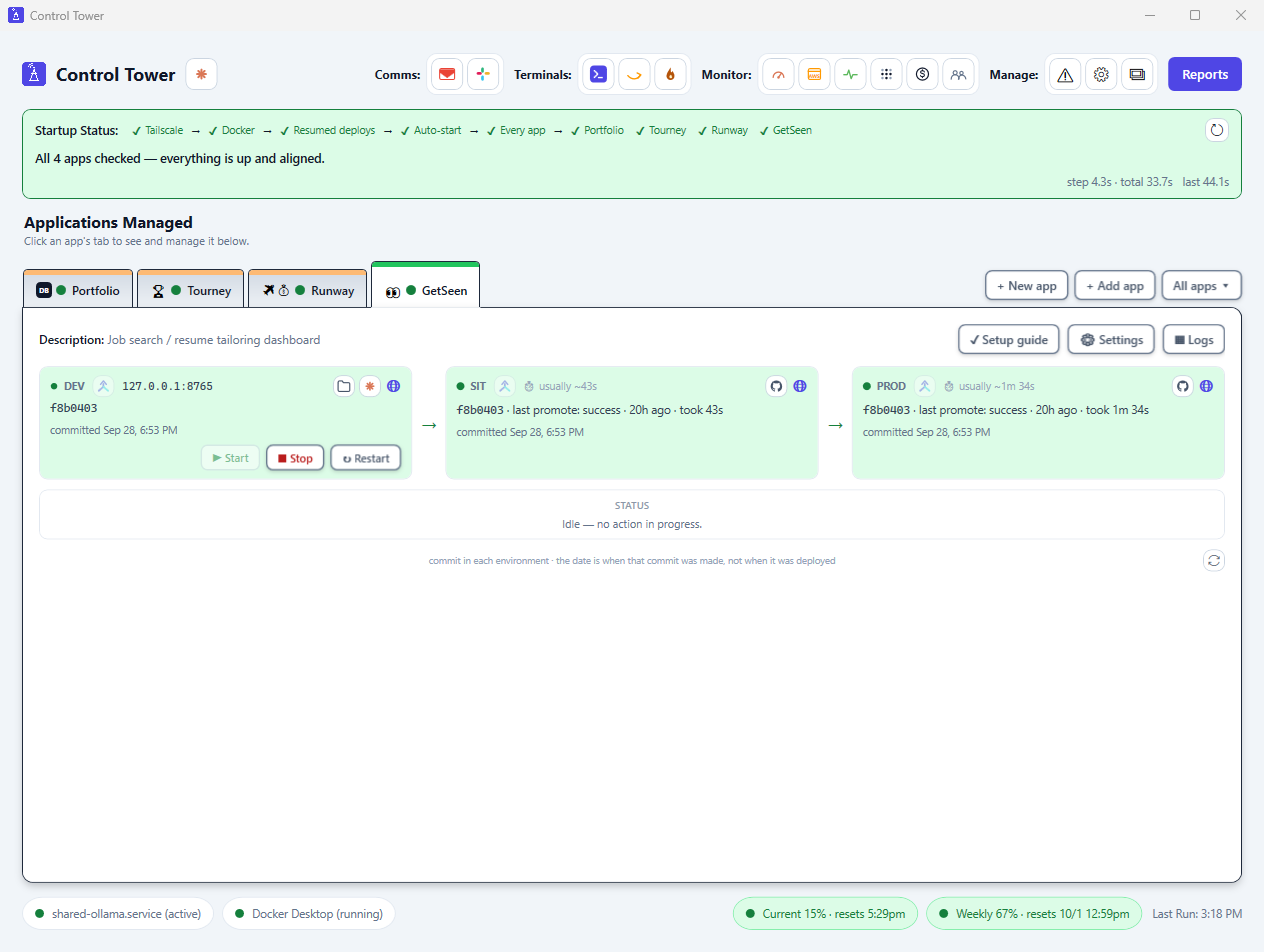
What Control Tower does
One dashboard, four apps, one governed path to production. Every line below is a real, shipped feature - not a roadmap.
See everything at a glance.
- Startup checklist - every launch checks Tailscale, Docker and GitHub sign-in, picks up any deploy that was mid-flight, starts the apps set to auto-start, then checks every app's Dev/SIT/Prod alignment and site health, one visible step at a time. If a sign-in is needed, it opens the login and waits.
- One folder tab per app - a live status dot and a colored top edge (green, orange, red) on each. Click a tab or use the arrow keys; the pane below becomes that app's full control panel. Tab order is set in Settings, new apps appear live, and switching is blocked while a deploy or promote is running on another app.
- A live Attention window lists every app's errors and pending work in one place, errors first, each with its own action.
- A live Dev → SIT → Prod comparison, read straight from git and SSH at the moment I look - never a log that could already be stale.
- One consistent visual language for status - green means aligned and ready, amber means drifted or needs a look, red means unreachable. Whichever action is actually running - a commit, a SIT deploy, a prod promotion - blinks in place, with a dark pulsing outline around that exact box, so "is it still working" is answered by looking, not by wondering. A red badge appears the moment a promotion fails, and stays until I've actually looked at it.
Control every app.
- Start / Stop - a real process-tree kill on Stop, not just closing a window and hoping the child processes go with it.
- Restart - stop-then-start in one click, for the "something's stuck" moment.
- All apps - one menu (Start all, Stop all, Restart all) for the start-of-day and end-of-day case where the question isn't "which app," it's "all of them." Each item greys out when it would do nothing.
Add an app, in Dev and SIT first. Full walkthrough with screenshots →
- + New app - a seven-step guided setup: it checks the PC first, validates the name and repo as you type, tests the SIT port end to end, then Claude builds the app while the guide follows the real state (repo created, keys added, checks green) and says what to do and when.
- + Add app - registers a folder that already exists. It detects the repo, a free local port and the start and stop commands; every field stays editable.
- Dev and SIT come set up - a repo with five CI gates and a secret-scanning pre-commit hook, a running Dev copy, and a SIT copy that redeploys on every green push. Either environment is optional, and an app without SIT or Prod simply shows it greyed out and is never counted as a problem.
- Prod is never part of setup - it stays a separate, human-triggered, fail-closed click (section 04).
One governed path to release. There is no second path: no one pushes straight to production by hand, and nothing deploys unattended without going through this app first.
- Commit Local - stages and commits a change, locally only. A "Suggest with Claude" button can draft the message from the diff first - I still read it, edit it if it's wrong, and it's still my own click that commits.
- Deploy to SIT - pushes the change, waits for that app's own CI to actually finish and advance staging (never races a pipeline still mid-run), then confirms the real deploy succeeded.
- Promote to Prod - the gated one. Refuses unless every automated check on that exact commit is green, checked fresh at the moment I click, never from an earlier look - see section 04.
When something breaks. The closest thing here to an exception queue.
- A failed commit, deploy or promotion is caught automatically - a toast notification and a red badge on the app, so I'm not the one who has to notice first, whether or not I'm looking at the window when it happens.
- A site that goes down gets a red card under the startup bar: the likely cause, what to do, and an AIOps diagnosis button that reads the container logs, web-server errors and server health. Where a fix is safe (reloading the web server), it is one confirmed click.
- One click hands the real GitHub Actions failure log to Claude, on a disposable clone of the repo - never my actual working copy. It reads the log, diagnoses the real cause, and, where it's safe to, writes an actual proposed fix.
- I review the diagnosis and the exact diff before anything happens. Approve it, and Control Tower commits it, pushes a new branch, and opens a real GitHub pull request - the normal review and CI gate still apply, nothing skips the line.
- Watch it on GitHub - jumps straight to the real pipeline run instead of trusting only a confirmation dialog.
Prove it happened.
- Every action - start, stop, deploy, promote, refusal - writes one permanent record: app, commit, result, and the real Windows user who did it.
- Reports opens six views built entirely off that same record: full history, live state per app, drift between SIT and prod, failures only, a breakdown by who approved what, and an on-demand recheck that SSHes into every environment and reads the real commit - for the one time the log itself might be behind reality.
Everyday shortcuts. One-click terminals already pointed at the right place - a repo's own Claude Code session, production, or the machine running the AI workers - so an investigation never starts with "wait, what's the connection string." Plus one click to open a project's folder, jump to its GitHub Actions tab, or check Claude usage, all from the same header, grouped as Comms, Terminals, Monitor and Manage. Two usage bubbles at the bottom show current and weekly Claude usage against their limits, and Monitor also opens GitHub billing (Actions minutes), UptimeRobot, Tailscale, and a visitor report of unique production visitors with me and known bots filtered out.
See every integration on one page → - Claude, AWS, NVIDIA, Docker, GitHub, Windows, Gmail, Tailscale, Slack, and UptimeRobot, and what's actually automated versus just a click away.
Where it sits
Tourney, Runway and GetSeen are the products. Control Tower is not a fourth one - it is the operating model they run under, the same way an enterprise platform team runs the applications it supports. See it in the architecture map →
Architecture
The real shape of it: one desktop app, on one machine, sitting between GitHub and three environments for each of the four apps it governs. Every arrow is a real thing Control Tower does - not a simplified stand-in.
Nothing selected yet — click a box above.
Fail-closed, on purpose
The promotion check has exactly one job: read the real check-runs GitHub recorded for the commit being promoted, and refuse unless every one of them says success. Not "looks fine." Not "the last one I saw was green." The actual, current state, read fresh every time.
- No checks reported at all - refused. A commit GitHub has no record on is not a commit anyone should be able to promote by accident.
- Any check still pending - refused. A promotion that races a still-running test suite is a promotion that means nothing.
- Any check failed - refused, full stop. One red check anywhere on the commit is enough.
- One deliberate exception - a check-run literally named
promoteis ignored when evaluating the gate, so an earlier failed promotion attempt on the same commit can never permanently block a later, successful one.
This logic has its own test suite, run in CI on every push to Control Tower's own repo - a bug in a fail-closed gate is exactly the kind of thing that fails silently open if nobody checks.
AIOps: a failed promote investigates itself
This is what makes Control Tower an AIOps tool, not just a deploy dashboard. When a promote-to-prod run fails - whether I was watching or not - Control Tower doesn't stop at a red status. It clones the repo into a disposable folder, checks out the exact failing commit, hands the real failure log to an unattended AI investigation, and comes back with a plain-English diagnosis and, where it found one, a concrete proposed fix.
The AI is never trusted to act on its own: it can read and edit files in that throwaway clone, but it's never allowed to commit, push, or run arbitrary commands. The diagnosis and the full diff land in front of me first, every time - I either approve it or dismiss it. Only on approval does Control Tower commit exactly what was staged, push it to its own branch, and open a pull request against main - never a direct push to main, sit, or prod. An AI-proposed fix still has to clear the exact same review and the exact same CI gates as anything I write by hand. See the full mechanism in §13 ↓
The audit log is the point
Every action Control Tower takes - a start, a stop, a staging deploy, a production promotion, a refusal - writes one permanent record: the app, the commit, the result, and the approver. Append-only - nothing can be edited or deleted once it's written.
The approver is never typed in by hand - it's the real logged-in Windows username on the machine that clicked the button. Six reports read this same log back out, filtered different ways; nothing is reconstructed after the fact.
Honest scope note: this is identity capture and a single mandatory approval gate on a single-operator machine, not a multi-user permissions system. It would need real role-based access control if a second operator were ever added.
Built the same way it enforces
Control Tower is a standalone desktop app with its own private repo, its own CI, and its own test suite - the same discipline it holds every other app to.
Under the hood
Everything above covers what Control Tower is. From here on is why and how it actually gets used day to day, what it's built from, the fail-closed mechanism at its core, the test suite that backs it, and the AIOps loop in full - sourced directly from Control Tower's own commit history and code, not written from memory.
Why and how it actually gets used
Before Control Tower, running four apps meant four separate ways of doing the same things: starting and stopping each one, pushing a change to the test environment, and promoting a change to production, all handled slightly differently, by hand, one app at a time. Control Tower turns that into one habit instead of four.
The window opens with a startup checklist and one folder tab per app - each with its live status and exactly where its test and production versions stand. Picking a tab shows everything that app can do: start it, stop it, restart it if something's stuck, push the latest change to the test environment, or promote a change to production - the one action that first checks that every automated test actually passed before it's allowed to go through. One menu above the tabs handles the start-of-day and end-of-day routine - start everything, stop everything - and a reporting view shows the full deploy history, current state, and who approved what, all built from the same permanent record described in §06. It's in daily, personal use: every deploy and every production promotion, on every app, goes through it, because it's the only path that exists.
What it's actually built from
A standalone C#/WPF desktop application on .NET 9 - a real Windows GUI process, not a console script with a window bolted on. It owns every child process it starts directly: Process.Kill(entireProcessTree: true) for a real OS-level tree-kill on Stop, rather than closing a window and hoping child processes follow. Every shelled-out command - git, ssh, gh, docker info - runs through one shared, hardened runner that reads stdout and stderr concurrently and enforces a real hard timeout, replacing an earlier pattern that could deadlock if a child wrote enough to stderr while the parent was still blocked reading stdout.
The mechanism: fail-closed, enumerated
The promotion check has exactly one job: read the real check-runs GitHub recorded for the commit being promoted, and refuse unless every one of them says success - not "looks fine," not "the last one I saw was green," the actual current state, read fresh every time. Four separate conditions all refuse, each tested independently rather than folded into one generic "not green" check:
- No checks reported at all - refused. A commit GitHub has no record on is not one anyone should be able to promote by accident.
- Any check still pending - refused. A promotion that races a still-running test suite means nothing.
- Any check failed - refused, full stop. One red check anywhere on the commit is enough.
- One deliberate exception - a check-run literally named
promoteis ignored when evaluating the gate, so an earlier failed promotion attempt on the same commit can never permanently block a later, successful one.
The decision logic is split out from the GitHub network call on purpose - EvaluateCheckRuns(sha, json) takes the raw check-runs JSON and returns a verdict, with no network dependency at all, so it's directly unit-testable without mocking an HTTP call.
JOB_OBJECT_LIMIT_KILL_ON_JOB_CLOSE, so it dies automatically the instant Control Tower's own process exits, for any reason - normal close, crash, or a force-kill from Task Manager. No child of Control Tower's can outlive it again.Testing
200+ tests run in CI on every push to Control Tower's own repo - because a bug in a fail-closed gate is exactly the kind of thing that fails silently open if nobody checks. A passing test suite doesn't guarantee the shipped app is clean, though - test code once ended up compiled into it by mistake, invisible to any test result. The project file now explicitly excludes the test folder from the build, so what ships is checked directly, not just assumed from green tests.
AIOps: when something fails, the AI investigates it
This is the piece that makes Control Tower more than a dashboard with buttons: it's an AIOps loop, not just a deploy UI. When anything fails - a button I just clicked, or a pipeline run that failed on its own while nobody was watching - Control Tower doesn't just show a red status and wait for a human to go dig through GitHub Actions by hand. It automates the whole investigation, up to the one step that actually matters being left to a person.
- Detect. Every button's failure goes straight in - a failed commit, SIT deploy, promote or app start - and a background poller also checks each app's recent pipeline runs every five minutes. A site going down triggers it too, and any of it can be started by hand from a link. The automatic paths share one "seen" state - so a run is investigated exactly once, however it was first noticed, and a Control Tower restart never re-fires an old failure. A failure caused by a GitHub billing block is recognised and reported as that, without spending an AI run on it.
- Investigate. Control Tower clones the repo fresh into a disposable folder - never the app's real working copy, which may have uncommitted work of its own - checks out the exact failing commit, pulls the real failed-step log straight from GitHub, and hands both to a headless Claude Code instance with a 15-minute budget to actually read the code and find the root cause.
- Propose, never apply. That AI pass can edit files in its disposable clone, but it's explicitly forbidden from running arbitrary commands, and it never commits, pushes, or opens anything. It stops at a diagnosis and, where it found one, a concrete diff - left as uncommitted changes for a person to actually look at.
- A human decides. The diagnosis and the full diff land in front of me before anything real happens. I either approve it or dismiss it - nothing moves without that click.
- Only then, a PR - never a direct push. Approve commits exactly what the AI staged, pushes it to its own branch, and opens a pull request against
main. It never touchesmain,sit, orproddirectly, so an AI-proposed fix still has to earn its way through the exact same review and the exact same CI gates as any change a person writes by hand.
Site down is diagnosed the same way. When a live site stops answering, Control Tower collects the evidence over SSH - container state, restarts and out-of-memory flags, the last log lines, web-server errors from the last 30 minutes, disk, memory and load - and the same read-only AI pass turns it into a plain-English cause and next steps. The one safe fix on offer is reloading the web server, behind a confirmation dialog.